I had occasion to print a bunch of envelopes this weekend. Being the smug Apple fanboy that I am, I couldn't wait to show my wife how her silly Excel spreadsheet was going to get trounced by Apple's handling of contacts and envelope printing in Address Book.
We got the Address Book all up to date and I popped open the print dialog to show how easy it is to say you want to print envelopes. I'd show you a screenshot of that, but that's the reason for the lost sanity. After successfully printing some test envelopes, I realized that the text would line up better if I defined a custom envelope for the ones we were using. For those that can't stand Mac carnage, please stop reading now.
While entering my custom envelope dimensions, Address Book just sort of start ignoring me. That's odd, I thought. I closed the dialog and figured I'd try again. Well, I haven't seen that dialog since. Address Book now refuses to open the print dialog. I spent about 3 hours attempting to reinstall Address Book, reinstall the printing subsystem, and reapply the 10.4.6 update.
I got to learn all about Pacifist, a utility capable of reinstalling chunks of OS X, but even though Pacifist seemed to do its thing, Address Book was still snubbing me.
In my Google digging, I came across an alternative solution that was my last resort. It was my last because after using it, I'm much less bothered by the inability to print from Address Book.
The wonderful developers at Ambrosia Software have a free envelope printing widget! 
They call it EasyEnvelopes and it is fantastic. Aside from the oddness that it runs as a widget, it is perfect. It taps in to my Address Book contacts and provides quick searching for the person you want to send to. Type a couple of letters and select the contact and you are ready to print. Return address is already filled in based on the me contact in your Address Book. It is even flexible enough to allow editing of the return or to address before printing in case you want to add a spouse name, remove kids names, whatever.
I cranked out the envelopes as fast as I could load them in the stupidly designed printer of mine. Printing one envelope at a time wasn't a problem because I had to load them one at a time in the printer anyway.
My faith in Apple was shaken, but at least Ambrosia was there to pick up my shattered perceptions of perfect software, rainbows, and unicorns.
2006-04-24
My Sanity is in the Mail
2006-04-21
Boot Camp is About the Sergeants
My friends have already weighed in on Boot Camp, so now it is my turn. Boot Camp is a very crafty move on Apple's part. It's a direct strike at the remaining want-to-switchers. People want to think that you are Mac, or you are Windows, or you are Linux. Fact is, most people are none of those.
They are none of those because most computer users think in terms of sending email, browsing the web, writing papers, and looking at digital photos. Rarely to they think in terms of Outlook, Firefox, Word, and iPhoto. They might associate those names to apps they use, but they don't really care as long as they get to do what they want to do.
The Windows world is at a crossroads. Vista is long overdue, malware infestation is at an all-time high, and resent for Microsoft has been building for years. So, if you agree with me so far, why aren't people running in to the open arms of Apple? I'd say it is because no one is telling them to.
Most computer owners have the computer they do because someone told them that's the one to buy. Maybe their friend did, maybe their children did, maybe the guy at Best Buy did. My point is, they didn't know enough about the alternatives to even consider them. Most readers of this blog won't fit in to this category, but your friends and parents might. Those making the recommendations are the sergeants. They are respected enough when it comes to computers for folks to act on their recommendation.
With Boot Camp, Apple is targeting those sergeants. Apple doesn't expect every IntelMac owner will install XP. In fact, they'd probably prefer you ditch Windows all together, but you and I know that you can't just quit Windows. You need it for work, or you need it for your taxes, or you need it for a game, or you need it for some ancient piece of hardware that you still use. Apple doesn't expect basic users to use Boot Camp, but they sure are hoping that advanced users will know about it. Those advanced users might have been siting on the fence, clinging to that last excuse of not being able to run Windows apps as the reason they haven't tried what Apple is cooking.
Now they can, and Apple is happy to let the entire OS X experience speak for itself. Advanced XP users can slowly explore OS X and still have a safety net of booting in to XP. Over time, I'd expect a few of the advanced users to become true switchers and then have an influence on those around them when it comes to buy new computers.
This is just my opinion. This really-really-really-really smart dude thinks Boot Camp will convince Mac users to swtich to Windows. Uhhh, yeah.
2006-04-19
I'm Expired, Sorry For the Mess
Today, I offer another plea to software developers. I just tried to open a file on my iBook here. The file is a Word .doc. At one point I had installed the Office 2004 demo. That's long expired, yet .doc files still open with it. It then tells me how it's expired and I should go buy it and then exits. Thanks Microsoft. I get it. I haven't purchased your software. Now will you please release the damn file associations? I can open that .doc in AppleWorks 6 and TextEdit and read it enough to get what I need out of it, but I don't even get that opportunity because of the helpful "buy me now" interceptor.
After two (2!) runs of the "Remove Office" program, it's finally gone and the file association is back to AppleWorks, but why can't Office just be nice to me and remove the association after the Test Drive expires? I hate how their efforts to sell me something outweight my need to get something done.
Software developers, if you take over file associations with a product that can be expired, remove those file associations when you expire the product, please!
2006-04-16
Pennies Per Play
I've reached a milestone in per-track paid downloads from the Internet. This weekend I noticed that I am now over 1000 tracks in my Purchased Music playlist in iTunes. I figure that I have spent about $700 so far on that music. Where did the other $300 go? Well, some of those were the free downloads of the week. Some are free when you buy an album with more than 10 tracks, and at least 100 of them have come free from Mountain Dew and Gap promotions.
If you are keeping score, I now have 4 days and 6 hours worth of purchased music. If you are keeping score even closer, you might wonder how many times I have listened to these tracks and how much each play costs.
Now, I wish I had the motivation and/or the AppleScript skills to sit down and knock out an all-in-one program to do this calculation for me. I have neither of those at this time, so I have turned to the good ol' standby, the command line. I'm sure one of the fabulous readers of this blog has tighter command line kung-fu than I and will offer a more pure, a more efficient, dare I say, a distilled solution. Until that happens, here are 4 steps of a hack you can do at home.
- We need to get the play counts of the purchased tracks. This is easy enough. Simply open iTunes, select the Purchased playlist and then click File - Export Song List. Give it a name (Purchased.xml) and set the format to XML.
- The XML is fantastic, but we really only need the raw play count data. Use the following command to yank the counts out and delimit them with plus '+' signs for later.
grep "Play Count" Purchased.xml | sed 's/[[:space:]]*Play Count<\/key> /+/' | sed 's/<\/integer>[[:space:]]*//' > add_up.txt
I'm using grep to pull the lines containing the play counts, and then 2 runs of sed to strip away the remaining XML. (If only I had my XSLT book at home, this would have been so much easier) This all gets tossed in to a text file that I'll pass to bc in a later step. Here's your chance to show your command line fu. I know I can probably do this all with a single call to grep, but I didn't really care to sort that out right now. - We now have all of the counts in a file, each on its own line. bc wants these all on one line, so crack open vi and enter this command.
:%s/\n//g
This will remove all new lines in the file and put everything on a single line.
Before exiting vi, add a 0 as the very first character to make the math statement valid. If you are vi challenged, hit i to insert, 0 to type the '0', esc to get back to command mode, and wq to save and exit. - Finally, feed that file to bc (basic calculator).
bc add_up.txt
You should get your number, and then you can type quit and enter to exit.
My play count total was 4220. If I use $700 as my expenses so far, I get 17 cents per play. It will be interesting to track that number as it goes up from buying more music, and down from more plays. To me, 17 cents is a great number. If you consider the average track in my collection is 5 minutes, I pay about $2 an hour to listen to iTMS purchased music. This would be even lower if I had a way to count the plays from CDs I burn for the car.
One final set of stats that I found interesting:
Tracks listened to only 1 time: 195 (not because I don't like them, I just buy music frequently)
Tracks not listened to at all: 2
Largest play count for a track: 20
What cool stats can you tell me about your iTMS library?
Sync your gCal to your iPod
I've never owned a PDA, but I have started to make use of the PDA features on my iPod. I like that I can sync my calendar and contacts and have them at a touch when needed.
The moment I heard that Google's Calendar was ready for use, I wondered if I could sync it to my iPod. I wasn't sure whether you could sync subscribed calendars from iCal to your iPod, so I tried it myself. The answer is yes, you can.
It's pretty easy to sync your gCal to your iPod. Simply follow this tutorial from TUAW to subscribe to your gCal in iCal. Then modify your iPod settings to sync all calendars, or you can specify your Google one specifically. 
That's it, you're done. You may want to adjust the refresh rate on your subcribed gCal, but other than that, it will sync up just like native iCal data.
Thank you Google and Apple.
2006-04-13
Better Schedule Time for Improvements (updated)
Google has release a calendaring app to beta. You might remember me wondering where such an app was just a short while ago. I've spent a little time playing around, and while I see great potential, I can't help but feel this is another "barely good enough" Google app.
For starters, it doesn't work in Safari. You get to see this great message.
I tried it anyway, and it barely works. You don't get a mini-calendar on the left and the agenda doesn't work at all. You also can't open any events once you've set them, so that's a deal killer. Firing up Firefox under OS X works just fine. I now have two reasons to use Firefox, Google Calendar, and IM through Gmail.
Next up, iCalendar support. Yes, it appears you can import iCalendar items, but who cares about that? That's useful for the switchover from one calendar to Google Calendar, but I want to sync events with other people. People who might be using Outlook, or iCal, or something else. I tried sending an .ics from OS X (iCal integrated with Mail.app) to my Gmail account. It shows up, but Gmail doesn't care a darn about it. This is where the integration needs to kick in boys. Google claims that Gmail is smart enough to pick out events in your messages and prompt you to add them. Ohh yeah? Then why didn't it let out so much as a peep when I sent the following text to Gmail.
Test Google Calendar, scheduled for April 13, 2006 at 5:15 PM.
As a test, I put the same text in to the "Quick Add" feature and it added it just fine. 1 point for the recognition engine. -1 point for Gmail's use of that engine.
Finally, what's up with the invite feature? I sent an invite to my home account. The email showed up with a .ics attachment. I was excited. I clicked that .ics and nothing happened. I saved it off and opened it in vi, and what did I find...
BEGIN:VCALENDAR
PRODID:-//Google Inc//Google Calendar 70.9054//EN
VERSION:2.0
CALSCALE:GREGORIAN
METHOD:REQUEST
END:VCALENDAR
Where's the calendar data? Can someone else send me an invite from Google Calendar so I have another sample?
This is a start, but more work is needed if I am going to use this on a regular basis. Jason appears to be enjoying it a little more than I am.
Update:
I got another .ics sample to look at (thanks Ian) and this one looks much better. Here, it is, raw and only slightly modified to protect the innocent.
BEGIN:VCALENDAR
PRODID:-//Google Inc//Google Calendar 70.9054//EN
VERSION:2.0
CALSCALE:GREGORIAN
METHOD:REQUEST
BEGIN:VEVENT
DTSTART:20060924T010000Z
DTEND:20060924T020000Z
DTSTAMP:20060414T185156Z
ORGANIZER;CN=Ian:MAILTO:removed@gmail.com
UID:abcdefg-removed@google.com
ATTENDEE;CUTYPE=INDIVIDUAL;ROLE=REQ-PARTICIPANT;PARTSTAT=NEEDS-ACTION;RSVP=
TRUE;CN=Ryan;X-NUM-GUESTS=0:MAILTO:removed@gmail.com
CLASS:PRIVATE
CREATED:20060413T151104Z
DESCRIPTION:View your event at http\://www.google.com/calendar/event?action
=VIEW&removed.
LAST-MODIFIED:20060414T185156Z
SEQUENCE:0
STATUS:CONFIRMED
SUMMARY:Friends and Family Night
TRANSP:OPAQUE
END:VEVENT
END:VCALENDAR
2006-04-10
OS X Usability - Good and Bad
Apple isn't perfect. There are always things that could be better. Here are just a few things they have done right, things they have done wrong, and a few suggestions for future improvements.
We'll start with the good. Ben Meyer, over on icefox.net, has a nice writeup comparing OS X with KDE. It's titled Nine things KDE should learn from Mac OS X and is worth a read. I especially enjoyed the points on identity, default application views, and having a capable viewer. I thought the screenshot of KDevelop was hilarious. I'm hoping it looks better on a bigger screen, but ouch, talk about confusing. I guess that's why developers get paid the big bucks, huh?
Now for some bad. My first complaint is that I can't show a date in the OS X menu bar. The checkbox in the Date/Time preferences leads me to believe I can, but as far as I can tell, I only get to see the date when I am using the floating clock, bah!
The other complaint comes from the process of getting the screenshot just above posted. I wrote a nice little Automator action to prompt me to drag out an area for capture and then post it to my iDisk for linking in blogs. It was working great. I say was, because it just quit one day. Today I got mad enough to go find out why. The problem appeared to be with my Keychain. Once I removed and added the iDisk Pictures folder, I was prompted whether I wanted Automator to update it's use of my Keychain. This Keychain prompt seems to occur after every 10.x.y update. Sometimes even more frequently. I have seen it many times with accessing WEP protected networks. The problem is, sometimes I have to reboot a few times to get asked whether it is allowed to update the Keychain! That problem showed here again where I had to go back in to Automator and screw with the action before it prompted me. Fix this Apple. The prompts aren't prompting like they should.
Finally, a couple of ideas for improvement. My target here is iPhoto. True, iPhoto isn't really a component of OS X, but it does ship with the device, so it is at least a part of the OS X experience.
* Camera Identity - iPhoto is smart enough to let you search based on a camera, but that isn't good enough. I want to be able to tell iPhoto that the Casio Exilim is mine, the Kodak EasyShare belongs to my parents, and the Nikon Coolpix belongs to my friend. This would make it much easier to sort out the origin of photos when I'm syncing multiple cameras and importing photos from CDs, thumb drives, and Bluetooth transfers. The camera data can stay attached to the photo. The identity of the camera can live in iPhoto because that is data that is relevant to me.
* Sanity Check the Dates - Isn't it amazing that I took photos in 2028 already! Wow, importing photos from 1995, are you sure? I had both of those dates appear on pictures in the last two weeks. Usually this is from a camera that had a dead battery or just took a dump for some other reason. This check could happen on the cameras as well, but I want iPhoto to be at least a little smart about prompting me about photos with dates that are way out of wack. If you are the type that will keep your computer to 2028, fine, we'll let you turn the sanity check off, but I'd really like to be prompted with "The photos you are importing from Ryan's camera appear to contain a date from the future. Would you like to choose a different date for these photos?"
5 of the Now
It's been a long time, I shouldn't have left you, without a dope beat to step to.
5 more to make you nod your head, move your feet, and exercise your brain.
I'm again gifting 1 of the iTMS tracks to the most creative comment that says why you deserve it. I am the judge!
- Coldcut - True Skool
 The long awaited Coldcut album is here. It's getting good reviews. I'm digging the first half a lot more than the second half. Good stuff though. This track features vocals from Roots Manuva. This guy is everywhere these days.
 - Cut Chemist - Storm
My brother was down in Austin for SXSW. I tried to get him to the Cut Chemist show, but he couldn't make it. Too bad, listen to this instead. If you like Cut Chemist, check out Product Placement, an amazing tour he did with DJ Shadow. It's on CD and DVD from djshadow.com. - Umut Gokcen vs. Ulrich Schnauss - Between Us & Them : Available for download from Umut's myspace site. Don't stop, get it get it! Ulrich has a space too.
- Broker/Dealer - Satin Jacket Smooth. Ordering the full album from Amazon.
- Grayarea - Yewminyst I've been loving this track forever. I just found it on iTMS, so I had to have it. Grayarea is from Chicago. I'd love to catch them live.
2006-04-08
Sweat the Commute
When I first read about a bus, full of exercise bikes, I thought it was one of the stupidest things I've seen in a while. Why in the world would you forgo the wonderful sights, sounds, and smells of a bike ride to sit in a loud, cramped, bus and ride a stationary bike? Then I thought about it a bit more and thought maybe it isn't such a bad idea.
BusBike is the name of the company operating the buses in Brazil. They have chosen to just drive the bus around scenic areas. That's part of the reason I thought this was so dumb. Riding a bike along a beach should not be done behind glass.
Today's working world has things that take time away from work and home. Two of those things are the commute between work and home and working out so you don't turn to a pile of goo from sitting at a desk all day like I do. To improve on the idea, I think they should combine the workout with commuting.
I personally couldn't make use of such a system, but I know plenty of folks that live in big cities that might enjoy working up a sweat on their way home from work. It could save an hour that would otherwise be burned at lunch. I tried to think about a complete mobile gym, but then I thought that 50lb dumbbells might not be such a great idea if the bus ever got in a wreck. However, chin-up bars are already pre-installed in busses! Add some stretching mats, yoga balls, $2 bottles of water, and loud dance music and you are all set.
2006-04-04
Not What Chevy Had In Mind
Be careful what you ask for. Chevy, along with the popular reality TV show, the Apprentice, has given folks a chance to make their own commercial featuring the Chevy Tahoe. I'm sure Chevy execs pictured dozens of captivating and complimentary commercials being made by SUV fans everywhere. Instead, they are getting a lot of pushback from the SUV haters of the world.
Rocketboom has as a full set of links, but don't spend too much time there. The commercials play out quite slowly and most of them are filled with crafty (hardly) lines like "you won't drive here".
While it is an interesting outcome of today's "remix" culture, it still annoys me. It's true, most people won't drive their SUVs on anything but pavement, but I can not stand the attitude that people have taken against SUVs. Being an SUV owner myself, I object to being grouped with those on the road that can't judge the size of their vehicle. I object to being told I am the reason the world is warming. I object to being told that I don't need that vehicle. These people obviously don't know me. I commute to work, on a bike, when I can. My goal for this year is 100 days. Recently, when I'm not riding my bike, I'm riding the bus. It takes me longer to get to work on the bus than driving, yet I still do it.
I own a 2002 NIssan Xterra. I just recently cranked over 20,000 miles. How many miles are on your car? I don't care if I do burn more gas. Am I burning more than the guy driving 15,000 miles a year? I don't need the vehicle huh? How would you suggest I put 3 muddy bikes in the back of a car? If your answer is an external rack, I'm way ahead of you. If I'm taking my bikes long distance, we do put them on a rack on our car. As for driving off road, I have driven, responsibly, on approved back country roads, in the beautiful state of Colorado. We aren't all late for soccer practice, so stop lumping us together.
Maybe instead of blasting Chevy, we should be applauding them for their efforts to bring us E85 capable vehicles [e85].
If you aren't a part of the solution, you are a part of the problem.
Reduce your use - carpool - ride the bus - ride your bike!
2006-03-18
5 of the Now
- Freeform Five - Electromagnetic (Evin Nine Broadway Dub) Nearly picked this up from Beatport, I think they just recently released this to iTMS. Freeform Five is great. Evil Nine makes it even better.
- DJ Shadow - Blood on the Motorway Not a track, an emotional journey.
- LCD Soundsystem - Yeah (Pretentious Mix) I dare you to walk down the street listening to this and NOT start struting.
- 20 for 7, Fred Everything & Vaness Baker - Friday (Trentmoller Remix)
You need a lot more than 30 seconds to get the groove of this one. You should be rockin' it! - Ashtrax - Freeload (Freelove) Quality, quality, quality.
Like any of these? Leave a comment why I should gift you one of these tracks. My favorite comment posted by noon on Tuesday (2006-03-21) will get that track gifted to them from the iTMS.
2006-03-14
Light Night
Here are a few pictures I captured this past weekend in Milwaukee. I was just playing around with extended exposures on various light sources.



I'm also including a shot of the sky on my drive home. The picture doesn't do it justice. I've never seen a sky look like this. It was like waves in the sky. Lots of people had pulled over to stare. 2 miles later it was gone.
2006-03-09
Anal Retentive Closure
I'm sure you remember my post on the stupid Simpson's box and the offer they had to order a non-stupid box. Well, I paid my $2 shipping and handling and finally received the desired box today. I can finally sleep. I can begin eating again. I can stop muttering about "the evil box". My DVDs are in line, and so is the world. Ahhhhhhhhhh.
The ugly lineup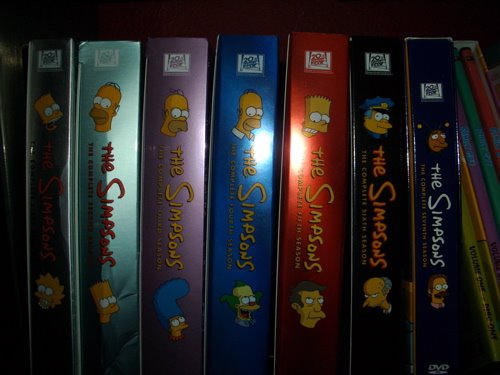
The proper lineup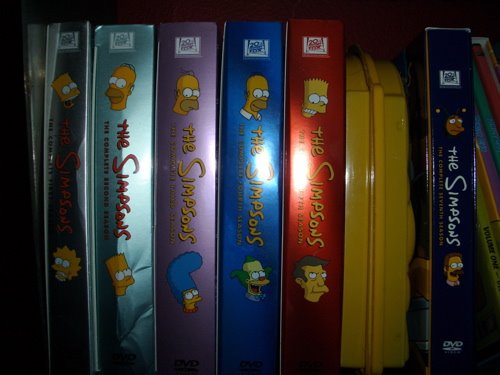
I like how they incorporated the huge Homer eyes from the original box in to the new design.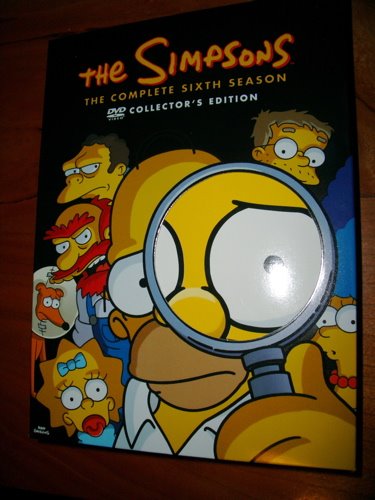
2006-03-05
Pencil Me In
We seem to be in the middle of a wave of calendaring apps. 30 boxes is gaining momentum, Apple pushes .Mac and its ability to sync your iCal calendar to the web, and Microsoft has decided to put a standalone calendar app in to Vista.
So, we have plenty of ways to see our calendars, but I'd like to talk about how we get things put in to our calendars. The key to calendar sharing these days lies with iCalendar. iCalendar, or RFC 2445, is a text based format, pairing values with known identifiers. iCalendar is not an XML format, but if that is your thing, check out hCalendar which is a 1 to 1 representation of iCalendar in XHTML. iCalendar can do everything you'd expect it to. Set a calendar entry, duration, notification, even advertise your busy and available times. iCalendar is widely supported. iCal, Outlook, and Sunbird all support iCalendar. The calendars are ready, it's the entries that are missing.
I am genuinely amazed that more apps don't make use of iCalendar. You'd think that any website announcing an event would offer a link to be added in to your calendar. You'd think that email apps would be able to embed appointments (no, Exchange doesn't count). Heck, you'd think that Google would have spit out a calendar app by now with GMail auto-linking things that look like appointments.
Let's explore some of the web sites that could offer iCalendar links.
- Movie Showtimes - Visit the page, find the one you want, click the llink to add it to your calendar. More on this later.
- Sporting Events - Live in Los Angeles? Visit the Lakers schedule site early in the year and click a link to have all of this year's home games added to your calendar.
- Earnings Calls - Daytraders and interested employess might like to know when their favorite stock is due for a chat.
- TV Listings - Maybe less for you and more for your ReplayTV or Tivo. Visit a web schedule and click the shows you want to watch.
- School events for the kids - Visit your school's site, drill down to your child's grade and add the month's events to your calendar. Field trips, baseball games, choir practices. It could all be there.
I'm sure you can think of dozens more. It is just strange to me that everyone has an RSS button on their pages today, but nobody I've seen has an iCalendar button. That's not to say that these sorts of calendars don't exist. While researching this blog entry (yes, I do research), I found a couple of resources that house these sorts of schedules. This is encouraging, but for the most part, these are user made calendars, and do not come from the official sources.
Now, let's take a look at how iCalendar files (.ics) are handled. It doesn't really matter how you open these files. They could exist on your harddrive, they could be attached to an email, or even linked from a web page. To test things, I made a simple .ics and linked it from a simple .html file.

iCal under OS X, is very slick. A window will pop up and ask you which calendar you'd like to add the event to. It is quite clear what is going on, so this looks hard to exploit.

As usual, Firefox asked me if I wanted to run the file. After that, Outlook under Windows XP asked me if I wanted to load the appointment, and promptly did when I gave the go ahead. These seems like an appropriate thing to do.

Also of interest, Outlook allows you to forward any of your appointments as an iCalendar file. Good for you Outlook.

Windows Mobile 5.0 also asks if you'd like to save the calendar data, but it could be a little more helpful in letting you know exactly what it is asking.

Even more interesting is the fact that sending the .ics over Bluetooth results in a prompt that actually lets you know that this is calendar data. Say yes and the entry is added. Slick. iCalendar and Bluetooth are a great pair.
I think the reason we don't see more iCalendar links is that there isn't a complete solution. Calendars change frequently and when we need them, we are usually on the go. For that to work, we need our on the go devices, like cell phones, PDAs, and iPods to sync frequently. Unfortunately, most people still sync with cables. Cables suck. If you sync with a cable, you can't get up to date data if your phone is still in your pocket. Cue Bluetooth, but having two devices capable of OBEX push isn't enough. You still need a broker in the middle to do the syncing. Ideally, we can continously sync while in range, but short of that, you could have a handler for .ics files that knows which Bluetooth devices to sync with when it processes a new calendar entry. Perhaps Bluetooth's continued rise will bring about a new focus on calendar and contact data because it can flow so easily.
Finally, let's get to a real example. Here's you chance to see how your system handles iCalendar files.
Read Thoughts Abound
While playing with the sample file, I found that Windows Mobile didn't like the timezone info that can be found in the examples on Apple's page. I read that a lot. Apparently iCalendar implementations are notoriously spotty. Hopefully that is a thing of the past.
Have you seen iCalendar files linked on websites? If you have, leave a comment with a link.
2006-02-25
Putting It All Together
Popular topics of this blog include:
- iPods
- The iTunes Music Store
- Music
- New software and features
- Usability and enhancing the computing experience
Put those all together, and what do you get? The best 5 of the now post ever!
I'm still playing with ChapterTool and all that is has to offer. I confirmed that you can chaptify protected AAC (.m4p), like those purchased from the iTMS. Here's hoping that Apple starts using this tech on continuous mixes you can buy from their store, like the latest Global Underground - Electric Calm (brilliant stuff).
I had 5 more songs for my "5 of the now" series, so I thought, why not just mix these very simply, and toss it cover art and links to the iTMS to complete the package. I'm quite pleased with the result. Album art shows in iTunes (upgrade Jason, upgrade) and if you like what you hear, just click the link and go buy it.
Here's the 5
- Bloc Party - Tulips
- UNKLE - What Are You to Me?
- Nobody - The Coast Is Clear (For Fireworks)
- Midwest Product - Ohfas
- Coldplay - Talk (Thin White Duke Mix)
Enjoy.
2006-02-22
Chaptify
I had amazing functionality within reach since iTunes 4.9 and I didn't even know it. This goodness I speak of is the ability to enhance AAC files.
I'm sure to many of you, this is old news, but this slipped right by me. Earlier this week, I was listening to a podcast from Sasha that I found while browsing the podcasts on iTMS. I happened to look down and noticed a bunch of vertical lines in the time bar for the mix. 

I quickly found that I could skip back and forth between tracks within the mix. I was elated. I'm pretty new to the podcasts, so I had never seen this before. After some googling, I found that what I was seeing, was an enhanced podcast. Enhanced podcasts allow you to do all sorts of cool things like set images, make chapters, add text pages, and even embed web links.
The items I found most intriguing were the chapter markers and notes page that could be displayed on my iPod.
I have been wishing for things like this for years. The chapters could allow me to break up long mixes and effectively remove the need for gapless playback. The notes page would allow me to include setlists and other useful information and have it just a couple of button pushes away, instead of in a text file loaded off under the notes menu item as I currently do.
Further googling led me to discover that Apple has released a command line tool for adding enhanced podcast content to AAC files. The tool is called ChapterTool (sorry, Mac only) and you can find a good collection of info about it over at the VoxMedia wiki. I grabbed ChapterTool and it is great. All you have to do is create a simple XML file describing the chapter cuts and specifiying any pictures and links you'd like to embed. Then point ChapterTool at your XML and source AAC and boom, enhanced goodness.
At first, I wasn't sure I could enhance anything but a podcast. Sure, a podcast is no more than a specially wrapped audio file, but I didn't know how iTunes/iPod would handle it. To test it out, I decided to enhance my recent DJ Mix, Hot Winter. Enhancing it allows me to add track infomation and allow skips between tracks, within the set. Here is a tast of the XML that I used.
<chapters version="1">
<chapter starttime="00:00">
<title>James Zabiela - Robophobia</title>
<picture>pictures/hot_winter.jpg</picture>
</chapter>
<chapter starttime="07:15">
<title>John Kelley - Force Ten</title>
</chapter>
It worked great. You can enhance "regular" files, they don't have to be podcasts. Apple should be making a big deal about this feature. Do other players on the market support this kind of thing? Apple should commission DJs to mix tracks from the iTMS and make them available at a reduced cost. These would be enhanced with album art for the individual tracks and would include iTMS links to the tracks. As you are listening on your computer, when you hear something you like, you simply click the hot link on the left and you can go buy that track. I guarantee that amateur DJs are going to make use of this. The professionals might as well be doing it too.
Back to the experiment. Within a few minutes, I had all of the enhancements added. I'm going to have to take this further. My next task is to write an app to take an AAC and a CUE file and automagically add the cuts and track info. I desperately need something like this to make the sets I grab from Hybridized.org that much better. As it is now, when I'm listening to one of these, I have to keep a browser open to the setlist. I haven't yet figured out how to add a text page like in the Sasha podcast, but I'm still looking :)
Finally, for your listening (and chapter mark testing) pleasure, I present, enhanced Hot Winter. If you don't have an iPod that can make use of the enhancements, be sure to try it out in iTunes. You'll get an extra button at the top that drops down to show the track info.
2006-02-21
Who is Talking?
Another silly screenshot for you. I know who is popping up this messagebox (Adobe Reader 7), but why should I have to play detective? Why don't you just tell me the name of the app you want to upgrade?
Ohh, and software companies if you are listening, we are in the day and age of not rebooting our computers every other day. I will leave a system up for months if it will let me. This means, you need to figure out how to apply patches without rebooting, or at the very least, queue the patches so they all get applied the next time I reboot.
Finally, why does a simple PDF reader require a system reboot?
2006-02-19
Amazon: A to B-side
Well looky there, people will buy music on the Internet. Now that Apple is rapidly approaching the sale of the 1 billionth track from the iTMS, it looks like there are going to be some late arrivals to the online music party. It's already a pretty jumpin' get together. Between iTMS, Napster, Rhapsody, some of the smaller players, and some of the dubious players, you'd think all of the angles were covered. Apparently Amazon doesn't think so. Rumor has it that they will launch their own music service this summer.
Amazon has a tough battle ahead. They already have a music store and I already buy a lot of music from them, but it comes on these shiny discs. The stuff that comes in digital form comes from iTMS and Beatport. They can however get some of my digital music dollars, and here is how.
- Don't make me choose. I don't want to pick between physical and digital. Let me buy the physical disc and instantly get access to the digital files for download.
- Give me more playback options. Make the music I buy available for playback from the web from any Internet connected computer. You might remember this idea from back in 1999 when MP3.com rose like a rocket and fell just as hard. Here it is, 2006 and we still don't have a stand out solution in this area. People are trying, but no one is winning. Amazon has the marketing power and cash to win.
- Allow reselling of digital music - Amazon has a well established used sales market. Nearly every product you can buy new, you can buy used. Having the ability to sell back the rights to a digital download would be huge.
- Better catalog than the rest - I buy a lot of music from Amazon because I can't buy it at my local Best Buy, or on iTMS. If Amazon can make that same catalog available digitally, they might get even more business.
I'll be watching this closely, but I'm not really expecting much. Just take a look at the mess (beta) that is the Google Video Store for my expectations of Amazon's offering.
2006-02-16
The Other Multimedia
Like it or not, most of the music and movies we buy still comes on physical media. Whether it be CD, DVD, UMD, Blu-ray, HD-DVD. VHS, Vinyl, whatever, we have lots of choices, and lots of opportunity to buy the same thing twice. In today's world, we take media with us. We consume it in multiple places and multiple sizes. Some of us even spend a lot of time converting from one format to another. The question I have for all (both) of the readers out there, is...
Would you pay more to have multiple formats in a single shrinkwrapped package?
This isn't an original idea, but it is an interesting topic to me. Bandai is already shipping DVD and UMD together. Too bad UMD isn't doing too well. Is this a move to plant a few more UMDs? You can get BT's Monster soundtrack on both DVD and CD in the same package. DJ Shadow has done similar with his releases. This has been fantastic because I can grab the CD when I'm off to the car, or watch it at the computer or from the couch when I'm at home.
As we move to high-def movies, won't we still want to watch those movies on our old DVD players? You can watch DVDs on Blu-ray players, but not the other way around. In this case, I think I would pay an extra $5 to have a fully produced DVD along with my shiny new Blu-ray.
What about digital files? All of the media producers are scared to death that the second a movie is bits, it is shared with everyone with an Internet connection. I really don't think that's true. You'll always have the pirates (arrrrr) that, no matter what the price, will think it is too much and will delight in getting it free on the Internet. Those people are a lost cause. Forget about them. What about folks like myself? I pay for my media, and I am penalized for it. If I want to put a DVD on my iPod, I have to use illegal tools to do so. Even worse, the morons over at the RIAA want us to think the act of ripping tracks to play on our favorite MP3 player is not fair use. Would the world end if pre-shaped digital copies of our media were included with our DVDs and CDs? By pre-shaped, I mean mp3s formatted for DAPs and MPEGs with the appropriate bitrates and dimensions for iPods.
If it really is all about licensing content, rather than owning it, why don't we already get all of these physical formats for free, or at least at a small shipping cost if requested?
Would you buy it?
Dock, Dock, Goose
I started to write a comment on this post about iPod docks, but found I had enough material for a post of my own, so here we go.
The dock in that post looks very nice. I especially like that they included a screen shot of the TV interface on their website. Too often, companies leave out important details like that.
I have a love/hate relationship with iPod docks.
- I love the looks of an iPod in the dock.
- I love that Apple's latest universal dock, you can change out the inserts to support multiple iPods.
- I hate that you have to change the inserts to support multiple iPods. It is harder than I'd like and you still have to keep the inserts sitting around somewhere, waiting to be used. I wish they could make a two sided dock so you could just flip it over to use a different flavor of iPod.
- I hate that there aren't extra USB or Firewire ports on the docks. Not a big deal for many users, but as a Mac mini owner, my ports are precious. Sure, I can add a hub, but that adds clutter.
- I love that you can use remotes with the various iPod docks on the market.
- I hate that they are all IrDA. Bluetooth wouldn't require line of sight, could potentially go farther, would allow for 2 way data, and make it far easier to hack your own solution (Salling clicker anyone?)
I own an iPod and use it often, so I like the idea of a Mac with a built-in iPod dock. Then again, you have the same problem as the universal dock. You still have to keep silly inserts around to accomodate other iPods in your house.
Unconventional docks are another topic. You can dock your iPod in your alarm clock, in your living room stereo, and even your car.
These docks are great, but unless I need to charge, I'd rather just send the sound wirelessly and do away with the dock altogether. I want A2DP in my stereo so I can seamlessly finish the album that I was jammin to during the walk home from the bus. I want A2DP in my truck so I don't need an iTrip, and I don't need cables in my glovebox.
2006-02-13
Throttle vs. Availability
I've been a Netflix subscriber since February 2001. I love it and I don't think I'll get rid of it anytime soon. That said, I'm not real happy about the word from Netflix, that they do, in fact, throttle users that burn through discs faster than most. The thing is, I'm less pissed that they artificially slow down the heavy users. I'm more pissed that I purposely stay away from their new releases to ease some of the crush, yet I don't get any preferential treatment.
I'm pretty much caught up on newer releases. The only new releases I need to see are the ones that are coming out week by week. Most of our queue is full of independent films, lesser known documentaries, sports films, and even a few dozen movies from the 80s and early 90s. As near as I can figure, I'm requesting the discs that are sitting around gathering dust. I'm doing Netflix a favor! I stick the available discs at the top and wait for the Short Wait, Long Wait, and Very Long Wait discs to fade in to the mass before putting them at the top.
So what do I want? I don't want to be throttled up. I wish they would ship me discs faster, but what I really want is a +1 modifier for my queue availability. In other words, Short Wait becomes Now. This modifier would stick as long as the majority of my discs (75%?) came from the Now population. This would allow me to see a new release every now and then without keeping discs longer, just to make me rise in the "to receive" pool.
Now, don't get me wrong. I'm not saying you can't get new releases from Netflix, but you may have to wait a week or two for the popular ones, and maybe a month for discs like Doom. I guess the geeks are all over that one :) It's 104 in my queue. Left at that spot, I'll probably see it in 2007.
2006-02-11
Fair Use?
Digital Rights Management is a tricky topic. I can certainly see both sides of the argument. Artists, and more importantly, the owners of the copyright to their works, have an interest in being compensated for their work. On the other hand, consumers of that work expect certain freedoms to use that work. The freedoms may be implicit, or they may be explicit.
Until today, I've never run in to a situation where I found Apple's DRM on music purchased from their iTunes Music Store to be unfair. I can load it on to my iPods (I really don't care if you can't load it on your favorite player). I can play it on computers I use at home, on the go, and at work. I can burn CDs for the car. I can make backups. I'm aware of their rules, and they seem to suit me fine. You could argue that I'm giving up some of the freedoms that purchasing a CD would provide, but this is amicable to me. I get convenient, instant, access to music that I may not otherwise get the opportunity to hear. In fact, in many cases, I am able to purchase the music at a discount compared to other sources.
In DRM discussions this week with my friends, a question arose. Could Apple's own software be used to remove the DRM on iTMS music? The answer to that is of course. You can burn the music to CD and then rip it right back in to iTunes. That part is clear. The thing I wondered, is if GarageBand could be scripted to load a track in and then saved back out, DRM free. It isn't that I want to do this, I was just curious how deep the DRM support in iLife went. If DRM removal was the goal, software like JHymn already does that sort of thing. From my earlier post on ring tones, we saw that GarageBand's media browser provides easy access to the iTunes music library. What I didn't realize, is that I happened to pick some music that was ripped from my own CDs, not a track from the iTMS.
Clicking on the purchased music source in the media browser results in an annoyingly blank window. GarageBand has apparently been told to ignore all DRM'd music. That's not cool. Certainly making a ring tone from a song from the iTMS is no different that making a ring tone from that same song ripped off of a purchased CD. Certainly using a track from the iTMS in a podcast about recently purchased music falls in to the fair use category of for illustration or clarification of the author's observations;. Not so fair, huh?
This leaves a bad taste in my mouth. Who decided that DRM'd music can't be used in GarageBand? It doesn't look like a technical problem. It isn't an AAC vs. MP3 thing. My other experiment used an AAC. It's not a playlist issue. Clicking on other playlists that are a mix of DRM'd and non-DRM'd music will show the nons only. Surely they didn't just forget to add in the support for DRM's music, right? So who decided this? Did Apple do it to avoid potential legal issues? Did the deals with the record companies require it? The iTunes Music Store Terms of Service tells me that You shall be entitled to export, burn (if applicable) or copy Products solely for personal, noncommercial use. They've already put it all on me, why are they pulling back once we are outside of the friendly confines of iTunes?
I'm not a DRM is bad kind of guy....yet.
2006-02-09
5 More and Alternative Music Stores
I've been on an absolute music binge lately. This happens every so often. I just get to a point where I want to hear stuff I've never heard before for a couple of weeks. Because of this, you are getting to read more music posts than usual. Maybe that's good, maybe that's bad.
I have been so excited to get new music that I bought music from a source that I haven't bought from in nearly a year. Beatport is a great online music store for electronic music heads like myself. I have been very impressed with the electronic and dance selection on the iTMS. It, plus Amazon, are expansive enough to have kept me satisfied for the last year, but they don't even hold a candle to the stuff you can get on Beatport. Beatport is where you get the stuff that you'd find in big city record shops. Beatport is where you get the stuff that has just been recently pressed. Beatport is where you get the stuff that your favorite DJ is playing. Beatport is where you buy tracks that you hear on Progressive Sounds SpinCasts and just have to have!
Beatport is also interesting because it is one of the only online music stores to sell individual tracks, in plain ol' MP3 and even WAV. They don't use DRM and the sound quality is great. I'm not crazy about their silly site, but you should really give them a look.
Now on to the 5
- Dave Seaman Presents Group Therapy ft. Nat Leonard - Faith Again (Luke Chable Remix) : This is the one that got me back to Beatport. I'm loving this. [Get it on Beatport]
- Starkillers - Diskoteka (Kobbe & Austin Leeds Mix) : Deep in the Diskoteka, these beats can make you wetta [Get it on Beatport]
- Mylo - Destroy Rock & Roll
Fantastic album that recently released to the iTMS although import variations have been on Amazon for awhile. I first took notice of Mylo with Drop the Pressure. That track now comes with a little Miami Sound Machine 80s flavor. The album is quite varied and definitely fresh. - Freestylers - Push Up (Plump DJs Remix)
- Beanfield - Tides (C's Movement #1 [Carl Craig Remix]) I have been listening to my Sasha CDs again this week. Sasha's use of this in Fundacion NYC is tremendous.
Let the music play.
2006-02-08
Fast Food Usability - Part 1
I eat a lot of fast food. I wish I ate less, but I must not wish it too badly because I haven't done much to change. Anyway, since I eat out so often, I encounter quite a few things that bother me about fast food. I'm going to note some of those things here over a series of posts. I'll do a lot of complaining. You'll see my pedantic side in full force. However, I will offer some suggestions for improvement as well. You have been warned.
Part 1 - The Receipt
Who decides what goes on a receipt? What is the point of the receipt? Is it to record my purchase for all eternity (at home, in the file, under 'D')? Is it to ensure that I get the proper order when it comes out? Is it to settle disputes when someone says they ordered 12 McFatpads with cheese and only got 11? Is it a legal requirement with some of the details required by the corporate bean counters? They all seem to have differences, so no one really knows.
Let's take a look at a couple of samples, shall we?
Taco Bell. I like the Bell. I eat there quite a bit, usually at least once a week. I enjoy their food. I enjoy their prices. I can't stand their ordering process. I'll save the physical layout for another day. Today we'll just concentrate on the receipt.
Taco Bell uses a "magic number" ordering process. When you order, you get a magic number assigned to you. Don't forget your number. If you lose it, NO SOUP FOR YOU! Thankfully, Taco Bell gives you some paper with your magic number on it, but good luck finding it.
- We start with the resturant name. This receipt tells me we are eating at T A C O B E L L. What's with the caps? What happened to all of that corporate branding they spend millions of dollars on each year? This isn't the 70s. There aren't any spinning heads hammering out glyphs on these tickets. Usually, these are modern, thermal printers. I know a thing or two about thermal printers. I know that given the right esc sequences, they can draw some pretty damn good pictures. So why don't the super powers of the fast food world make use of that and draw the Taco Bell logo in its full bell-thunking glory? It probably costs too much to hire someone to figure out the details of that fancy cash register.
- In item 2, you can see that they note the store number. It's mentioned twice within one inch, just in case you miss one. Are there times where these might not match? Maybe, but then what use are they to me?
- Item 3 is the guy that sparked all of this. Some of the registers at my local Bell used to print the order number in a larger font. That's a giant plus. Too bad they don't do this anymore. Instead, we get the order number positioned way off to the left, far from the identifying text. As I said, I eat there a lot, so I know where the number is, but what about a new customer? Which of these magic numbers are they supposed to figure out as the one? Please remember, these are the same people that wait right by the registers thinking their food is going to come out prior to the nine people waiting behind them. Problem solving skills aren't necessarily their biggest strength. You better find that number. The guy is only going to shout it nicely once.
- Register number. Great, I always like to know that. Tell me again why the register is numbered 5 when there are only 3 registers in the whole joint? Hmm, must have come from a bigger store. What does knowing the register number do for me? Is that so they know who to yell at when I call in and complain? Couldn't that be tacked on to the store number to clean it up a bit? 004470:5
- The CMBGSB! Crunchy, spicy, CMBGSB! Either tell me what I bought or don't. CMBGSB doesn't tell me jack. BGS-CK means I wanted chicken (ohh crap, he cracked the code). What's wrong with it saying Chicken? Ohh, and PEP must mean Pepsi. Aren't the Bell and Pepsi one in the same? Why not print the whole product name. Say it loud, say it proud!
- CASH TEND - I bet they save 12 million dollars a year leaving off that pesky ERED. We don't need to abbreviate anymore guys. The thermal head passes right by. You can let it print more stuff. I guess I can't say for sure, but I highly doubt those extra letters are going to kill their cash register budget. If they want to save letters, how about leaving off the "thanks for being you" crap they put on there. I won't get mad if they don't thank me on the document, trust me.
Ohh, I need a chalupa. Let's direct the hate towards our next victim.

- I like Arby's too. They get a lot of business from me and my friends at work. Cleaner, better separation of the restaurant name. That's a good start.
- Whoa, useful info. I even have a name to ask for when I'm pissed off. Score. Arby's is looking good.
- Questions? Comments? Hmm, I'll have to email them a link to this post. Still not too bad. No, wait, they included the same damn info again at the bottom [3b].
- Benjamin, you were great at taking my order, but I don't think you'll remember me, so why do I need to remember you? Also, why is your identity so important to be at the top? I feel left out. This is supposed to be about me! Please note your transeqno. Let go! Nobody listens to transeqno!
- Your transeqno may, may, be similar to your Order Number, maybe. Again, we note it twice, just in case one breaks down. It is at this point that we note that Arby's also uses a magic number order system, only there's is built around some sort of subliminal nonsense. You can see your order number on their fancy new flatpanel screens, but then it disappears, never to be seen again. The order number they put onscreen is only a portion of the one noted on the ticket. Great. Ohh, and you don't get to hold your receipt, so you must remember that number. No wait, my bad, they don't call out the number, so I don't know why they bother showing it to you to begin with. Rather than confuse me with a split second display of 195, why not do your "thanks for choosing us" thing on the screen?
- The Ckn is almost as good as the CMBGSB at the Bell.
- What's this? Did I change my mind on the fries? No, they just default to curly. That's great, but why do I need to know that on the receipt? I didn't order a Jamocha shake either. How come it doesn't say - JamShk?
- Why a ':' on some fields and not on the others? Yes, very picky. I blame the "one of these things is not like the other" song!
- This one was just weird. I didn't pay cash, I paid Cash $20, and sure enough, it had a value of $20. That Jackson, he's a wacky dude.
Stay tuned for a post unveiling my super-duper-perfect receipt design.
2006-02-03
5 of the Now

For this selection, I have 4 laid back and quiet songs, and 1 not :) I'd like to thank my brother for turning me on to LCD Soundsystem. I don't quite like all of their stuff yet, but it is growing on me.
Holmes Ives - Nux (Slumber Song)
Telefon Tel Aviv - Sound in a Dark Room
Morel - Wake-Up
S.J. Esau - Fat Cat
LCD Soundsystem - Daft Punk Is Playing at My House
2006-02-02
Create Ringtones in GarageBand
What can you do with a stock Mac? A whole lot of stuff.
Tonight I took a look at GarageBand 3, part of iLife '06. Specifically, I wanted to play with the new podcast studio. I didn't want to just mess around, so I decided I would try to create a ringtone for my home phone. A ringtone? Yeah, a ringtone. The podcast studio has this great media browser which lets you access your iTunes library and it lets you do some very basic editing, so I figured it could do the task.
The whole process was dead easy. 10 mintues and I was done.
- Open GarageBand 3 and choose to make a New Podcast Episode

- Using the Media Browser, find the song you want to chop in to a ringtone and drag it to your podcast.

It doesn't really matter where you put it. We aren't going to do anything but edit it and play it back.
- Using the Track Editor at the bottom, find the portion of the track you want to use as your ringtone and cut away the rest. To cut, just select with the mouse and hit Command-x. Use can playback and use the looping feature as necessary to make sure you have the chunk you want.

- You should now have just the stuff you want in your ringtone. You can drag it clear to the left, or just position the play cursor at the start of it.
- My phone, a Uniden CLX 485, requires that I record the ringtone live, so I prepared it to record.


I then attached the audio cord from the phone to my audio source. I could have jacked directly in to my Mac mini, but my speaker control block has a headphone out, so I used that.
- Next, I hit record on the phone and play in GarageBand. Audio plays, I hit stop on the phone, give it a name and I'm done.


That's it. I now get to hear DJ Shadow playing when the phone rings.
This entire post brought to you with stock software from a 10.4 OS X Mac mini. Screen captures done with Command Shift 4, music from iTunes, editing and playback from GarageBand, photo import and resizing from iPhoto, and blogging from Safari. iLife seems to fit my life.