Apple has been seeing great success with Safari on the iPhone, but there's always room for improvement. On a recent trip to Chicago, I wanted to visit a local Apple retail store. The problem is that there are 7 of them in Illinois and I couldn't really tell you right off which one was close to me.
I was easily able to hit the retail site in Safari and figure out the store I wanted to visit, but then the gotchas started. The iPhone doesn't have copy/paste. Google Maps on the iPhone is superb, but you have to get the address in there. To transfer addresses from the web to Google Maps you have to play a game to have the people around you each remember a portion of the address and feed it back to you once you are on the maps screen.
I'd expect Apple to integrate this a little tighter. Perhaps they embed some geocode or microformats that Safari would know to pass to Google Maps. This is the kind of delight feature that Apple fans have come to expect ;)
Update
I found a workaround. It still isn't ideal, but better than nothing. With the address onscreen in Safari, select the search icon. You can now type in the address that you can see through the shaded screen. When you search, Google will give you the Google Maps link at the top of your search results. If you select that link in Safari, the iPhone will launch Google Maps within the iPhone, not Safari. This is what I want, but with the extra step of reentering the address. As Josh mentioned in the comments, a context menu like you get in the desktop Safari with the option to "Search in Google" would be an even better answer. The end game is still a one click map-to-this.
2008-03-18
Apple Dogfooding
2008-03-13
iTunes Pro
iTunes has grown quite a bit over the years. That growth has slowed a bit recently as Apple has focused on the other revenue streams that iTunes enables. That's probably a good thing. iTunes is getting dangerously close to doing too much. And what do you do when an app does too much? You make a pro version :)
I would pay for iTunes Pro if it had even a few of the following features
- Real library sharing - Yes, I can listen to my library from my other computers, but that's about it. I can't change ratings. Play counts don't increment, and I can't edit metadata. I hate having to make notes to myself on things to change when I get back to my main library. Leopard's Screen Sharing feature makes it a ton easier to just jump in and do it right away, but I still have to share the screen and deal with the resolution differences.
- Auto iPod convert - I'm sure you've seen the messages. "Blah blah wasn't copied to your iPod because it can not be played on this device." Fine, don't copy that one, but convert me one that will and put it on there. Let iTunes Pro come with a license for Quicktime Pro to make the transcoding possible.
- Better handling of multiple libraries - You can use multiple libraries with iTunes today, but it feels like something that got slid in so no one would notice. Make this a prominent feature.
- Stats - Plays per day, average rating, purchasing trends, most listened artists. I can think of tons, but then I like silly numbers like this :)
- VIDEO_TS support - This would allow streaming a DVD rip to the Apple TV and perhaps even tie to the convert for iPod feature I mentioned. Apple's DVD player supports this, why not iTunes?
- Codec plug-in support - Spread some love to the FLACers and Divxers. The iPod probably still won't play these. Hmm, maybe if there was a feature to auto-convert for iPod? Who cares if it looks like crap because of the transcode. If you don't want it to look like crap, turn off the feature and don't watch it at all.
- Cross library consolidate - Rip a CD to the MacBook, have it sync back to the main library on the iMac.
- Thru-sync - Plug my iPod into the MacBook, have it sync content from the main library on the iMac.
- Library sync to other computers - I already talked about this one in another post.
- Stat sync via .mac - As playcounts grow and ratings get added to an iPhone or iPod touch, let that data sync back to my main library via .mac. These are Internet connected computers. Let them use it and keep some .mac subscribers as a bonus. I want this so bad for keeping up to date on podcasts. I watch podcasts on at least 3 devices, but end up starting to watch ones I've already seen because I haven't yet sync'd the device that would tell my library I've already watched it.
- Sell through iTunes - We know software sales are coming. How about a similar model to sell your own music through iTunes. We know the tool already exists for the labels to use. Spin that into iTunes Pro and make the iTunes store *the* indie store to beat.
Those are my wishes. What features would you like to see?
2008-01-22
Spread the Sync
This is not a MacBook Air post. Trust me, you'd know if it was. That said, one of the complaints I've read about the MacBook Air is that the 80GB harddrive is too small. One reason folks think it is too small is that today's iTunes libraries would suck up at least half of that. You know what? They're right...if that's your main machine and keeper of your iTunes library.
Me, I wouldn't consider a MacBook Air a primary machine, but this isn't a MacBook Air post :) The meat of this is that the MacBook Air and every other secondary machine could make due with an 80GB drive just fine if iTunes had a new feature. Well, not a new feature, a feature that's been around since 2001. The feature I'm talking about is the ability to sync a subset of your iTunes library to a device, usually an iPod. I want my MacBook to act like an iPod to my main iTunes library. I want to use Smart Playlists to keep it popping with fresh content. I want my ratings, last played times, and playcounts to sync back to my main library. I want new content that shows up in iTunes on the MacBook to sync back to my main library.
With this feature, I can take 20GB of content on the go, and still have full access to all of my content using shared libraries when I'm back on my home network. The MacBook can wireless sync and I don't even have to know it happened. It would be great!
2007-04-16
Intel Inside...the TV
Mark Cuban has a post up at Blog Maverick discussing HDTVs as PCs. As to computers in the TV, I agree 100%. It just has to happen. Computers are now amazingly cheap and TVs are getting amazingly complex, or at least the stuff they need to display is getting amazingly complex.
Mark did say some things that had me shaking my head though.
Remember when you would buy a new PC every couple years to keep up and you would buy a new TV every decade ? Well thats about to reverse itself. You no longer feel the need to get the latest and greatest desktop PC, but you are about to get in the habit of upgrading your TV every couple years as new and original features and applications are developed for it.
Yes, I remember the computer treadmill. A new one every 2 or 3 years, just to be able to run what was current. There's no way I'm going to do that with TVs, especially TVs that now cost in the thousands, not the hundreds of dollars.
In 3 years the mainstream TV will be 70" and cost less than $1500. In 5 years, it could be 100" for $2500 dollars . Yes, you will make room for it. You will redesign the family room or your bedroom to make room.
I'm guessing Mark's house is a little bigger than mine. There's no way I can fit a 100" tv in either my family room or my bedroom. It might fit downstairs in what can be a home theater room, but even then, 100" is gigantic and you need to sit a long way away from that screen. People aren't going to build bigger houses to hold their bigger TVs. At least, not the masses.
So back to the computer in the TV. Absolutely, I want this. If you've seen an Apple TV, your first thought is Why can't they just cram that in the back of the LCD? I wonder if the current Apple TV is the first in a family of products. It doesn't take much imagination to picture a 30" Apple display with an Apple TV built in.
Apple isn't the only company that can make this happen, but they appear to be one of the few that care. The on screen menus of many of todays DVD players, receivers, and HD tuners look like they were designed by engineers. They navigate like they were designed by engineers. They frustrate the crap out of their users. In case I'm being too subtle, most engineers can't design UIs. The ones that can are usually designers.
Part of the reason they suck so bad is that they're written in low level languages running on very basic display hardware. It takes a lot of effort to make stuff look good with those resources. Contrast that with the Apple TV. It's a full-blown computer running a full-blown OS that can make use of full-blown development tools and techniques. The Apple TV costs $300, but that's not that much more to pay on top of a TV that already costs $3000. I say build it in. You might think this leads to the upgrade path that Mark suggests. I'd like to think the opposite. Build in some general purpose hardware and let folks at it. Look at all of the new functionality that has been built on the Apple TV. Look at the tremendous work done to add functionality to routers with the DD-WRT project. If you open it up (intentionally or not), they will build for it.
Let me run widgets on my TV. Let me cut out the weather warnings with stylesheets for TV. Let me build a channel guide that doesn't suck.
It seems to me that this is what Mark Cuban would want, and I think he does. He wants people to continue to sit in front of their TVs and watch HDNet. To keep them there with compelling user experiences. He even points out some of the ways that features are being added to TVs. However, pay attention to the subscription fees for services like caller-id on your TV though. I don't want a plan for my TV!
So, to sum it up, TV manufacturers need to build up the development capabilities of their TVs. Focus on the experience. Focus on the interface. Do these things and you'll get my dollars.
2006-11-16
What I Love About Safari
I like the Safari web browser. When I'm using a Mac, I prefer it, even when Firefox is close at hand. There are times when I must leave Safari (stupid web devs), but I'd say that 98% of my Mac surfing is in Safari.
In addition to just working, there are a few features in Safari that bring extra delight. These aren't all unique to Safari, but Safari does rock them well.
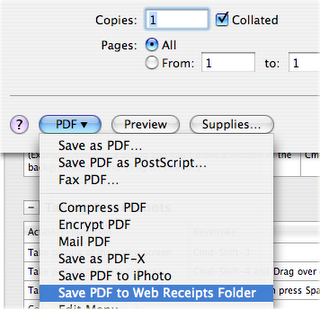
- Save PDF to Web Receipts Folder - This one is brilliant. No need to roll your own method for saving those "Print this page for your records" pages. You can even skip the paper storage because the PDF will let you print one years later if you really need it.
 Simple, clean, and minimal UI. From the back button to the integrated Google search, I don't think you could get it any cleaner. I remove the home button. That leaves back, forward, stop/reload, address bar, and Google search. Exactly what I need.
  Open in tabs - I use this on a daily basis. It is great for sites that don't have RSS feeds, or even ones that do that you prefer to browse directly.
 Fill forms from address book card - I love the tight integration. Other browsers will learn who they think you are. My computer already knows who I am, it doesn't need to guess.
 Sync bookmarks using .Mac - Yes, .Mac is probably too expensive for what it is, but I do like having my browsers on multiple machines keep the same set of bookmarks. This involves no mucking, where plenty of the other bookmark sync services do.